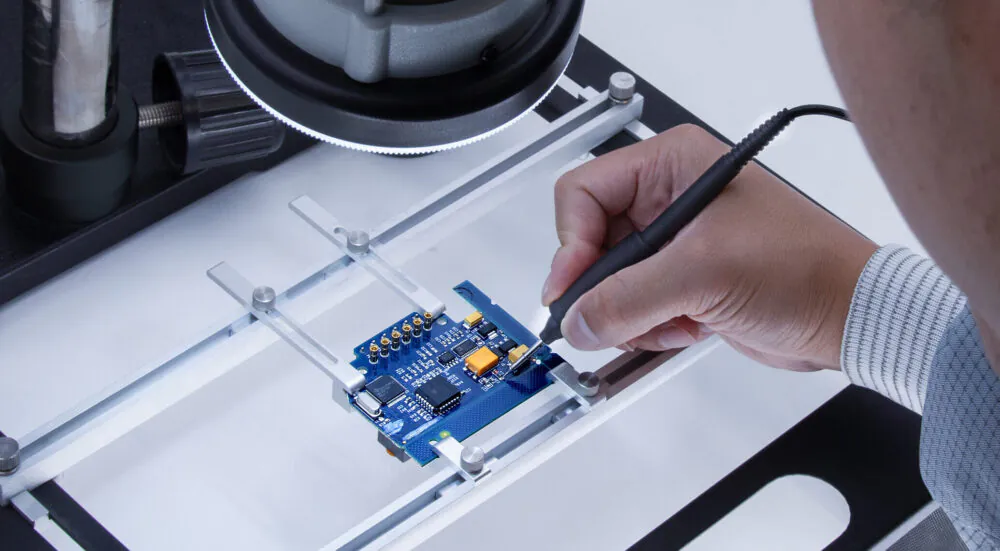
Ever dropped your phone and cracked a tiny chip inside? Or watched a repair technician fix something so small you could barely see it? That’s micro soldering in action.
Micro soldering is one of the most in-demand repair skills in today’s electronics world. From smartphone motherboards to laptop GPUs, these tiny solder joints hold everything together. One bad connection and your device is dead.
Whether you’re a complete beginner or someone who’s already comfortable with basic electronics, these 5 powerful micro soldering tips will sharpen your skills, save you money, and help you avoid the most common mistakes. Let’s get into it.
What Is Micro Soldering?
Before jumping into the tips, let’s make sure we’re on the same page.
Micro soldering is the process of soldering extremely small electronic components, often under magnification, onto circuit boards and PCBs. Unlike standard soldering, the components here can be smaller than a grain of rice. We’re talking about 0201 or even 01005 size components that require steady hands, quality tools, and serious focus.
It’s widely used in:
- Smartphone and tablet repairs
- Laptop motherboard repairs
- Game console board-level fixes
- Medical device manufacturing
- Aerospace electronics
If you’ve ever searched “micro soldering near me” after a device repair shop told you your board was “unrepairable,” you already understand why this skill matters. Many devices that seem dead can be brought back to life with proper micro soldering repair.
5 Powerful Tips of Micro Soldering
1: Choose the Right Micro Soldering Kit
Your tools define your results. A poor quality kit will frustrate you from day one.
A proper micro soldering kit should include a temperature-controlled soldering iron, fine-tip soldering iron tips, flux, solder wire (0.3mm to 0.5mm is ideal), tweezers, and a helping hands station. Don’t cut corners here.
What to Look for in a Micro Soldering Kit with Microscope
Many beginners skip the microscope and regret it later. A micro soldering kit with microscope gives you the visibility you need to work on components that are literally invisible to the naked eye. Look for a trinocular stereo microscope with at least 7x to 45x magnification. Brands like Amscope and Luxo are popular choices among professionals.
Recommended Micro Soldering Station Options
A micro soldering station is different from a basic iron. It gives you precise temperature control, which is critical when working with heat-sensitive components. The Weller micro soldering station is one of the most trusted names in the industry. Their WE1010NA model offers digital temperature control from 100C to 450C, which is exactly what you need for board-level work.
Budget options like the HAKKO FX-888D are also solid choices for beginners who want reliability without the premium price tag.
Quick Checklist for Your Kit:
- Temperature-controlled station (Weller or HAKKO)
- 0.3mm fine-tip solder wire
- No-clean flux pen
- Anti-static tweezers
- Solder wick for desoldering
- Isopropyl alcohol (99%) for cleaning
2: Master Your Micro Soldering Iron Technique
Having great tools means nothing if your technique is off. This is where most beginners struggle.
The micro soldering iron is your primary tool, and learning to use it correctly takes practice. Here are the core technique principles you must follow.
Temperature Control Is Everything
Too hot and you’ll lift pads, burn components, or damage nearby traces. Too cold and you’ll get cold solder joints that fail within weeks. For most micro soldering work, 320C to 360C is the sweet spot. If you’re using leaded solder, you can go slightly lower. Lead-free solder requires a bit more heat.
The 3-Second Rule
Never hold your iron on a joint for more than 3 seconds. Apply heat, add solder, remove iron. Clean and simple. If the joint isn’t right the first time, let it cool for 5 to 10 seconds before trying again.
Weller Micro Soldering Iron Tips for Beginners
The Weller micro soldering iron is famous for its consistent heat delivery. The key is using the right tip shape. For micro work, a fine conical tip or a small chisel tip works best. Conical tips give you pinpoint precision, while chisel tips transfer heat faster to smaller pads.
Replace tips regularly. A worn or oxidized tip is one of the biggest reasons for inconsistent results.
Hand Stability Tricks
Rest your wrist on the workbench, not your elbow. This gives you more control over fine movements. Many experienced technicians use a palm rest or even anchor their pinky finger on the board for extra stability. It sounds small, but it makes a huge difference.
3: Use a Micro Soldering Microscope for Precision
If you’re working without magnification, you’re working blind.
A micro soldering microscope is not optional for serious work. It lets you see solder bridges, lifted pads, and cold joints that you’d otherwise miss completely. Missing these issues means your repair will fail, your client will be unhappy, and your reputation takes a hit.
Types of Microscopes Used in Micro Soldering
Stereo Microscopes are the industry standard. They give you a 3D view of the board, which makes depth perception much easier when placing components. A good stereo microscope for micro soldering should have:
- 7x to 45x zoom range
- Large working distance (at least 100mm)
- Good LED lighting built in
- A trinocular port if you want to add a camera
Digital USB Microscopes are a budget-friendly starting point. They connect to your laptop and display a live feed. They won’t match a stereo scope for real-time work, but they’re great for inspection and learning.
Lighting Makes or Breaks Your View
Even the best microscope is useless with bad lighting. Use a ring light or adjustable LED arm light positioned at a 45-degree angle to the board. This eliminates shadows and makes solder joints much easier to evaluate.
4: Keep Your Micro Soldering Tips Clean and Maintained
This tip is underrated and overlooked by almost every beginner.
Dirty or oxidized micro soldering tips don’t transfer heat properly. You end up pushing harder, holding the iron longer, and damaging components in the process. Clean tips are non-negotiable.
How to Clean Your Tips Properly
Use a brass wire tip cleaner instead of a wet sponge. Wet sponges cause rapid temperature changes that crack tips over time. A brass cleaner gently removes oxidation without thermal shock.
Before every session, tin your tip with fresh solder. This means melting a small amount of solder onto the tip to coat it. It protects against oxidation and helps heat transfer smoothly.
After every session, apply a generous coat of solder to the tip before storing it. This “tip tinning” process extends tip life significantly.
When to Replace Your Tips
Replace micro soldering tips when:
- The surface looks pitted or eroded
- Solder doesn’t wet the tip properly even after cleaning
- You’re getting inconsistent heat transfer
- The tip has visible black oxidation that won’t clean off
Quality tips from brands like Weller or HAKKO last longer than cheap alternatives. Spending a few extra dollars on good tips saves you from ruined boards and failed repairs.
5: Know When to Call Micro Soldering Services
Not every repair is a DIY job. Knowing your limits is a sign of experience, not weakness.
If you’re working on a high-value device, a complex BGA chip, or a board with water damage across multiple components, calling professional micro soldering services is often the smartest move.
What Professional Micro Soldering Repair Covers
Professional micro soldering repair services handle:
- BGA chip reballing and replacement
- iPhone and Android CPU/NAND repairs
- Laptop GPU and power management IC replacements
- Water damage board-level cleaning and repair
- Broken charging port trace repairs
These are jobs that require years of experience, specialized equipment, and deep knowledge of specific board layouts.
Finding Micro Soldering Near Me
When searching for micro soldering near me or micro soldering repair near me, look for shops that specifically advertise board-level repair. Not every phone repair shop offers this service. Check Google reviews, ask about their equipment (a shop without a microscope is a red flag), and ask if they’ve worked on your specific device model before.
For those in the Pacific Northwest, micro soldering repairs in Portland, OR has a growing number of qualified technicians with strong reputations in the community.
Micro Soldering Service Pricing to Expect
Prices vary widely depending on the repair complexity. A simple pad repair might cost 50 to 100 dollars. A full BGA reball job can run 150 to 400 dollars or more. Always get a diagnostic quote first.
Automated Micro Soldering: The Future Is Here
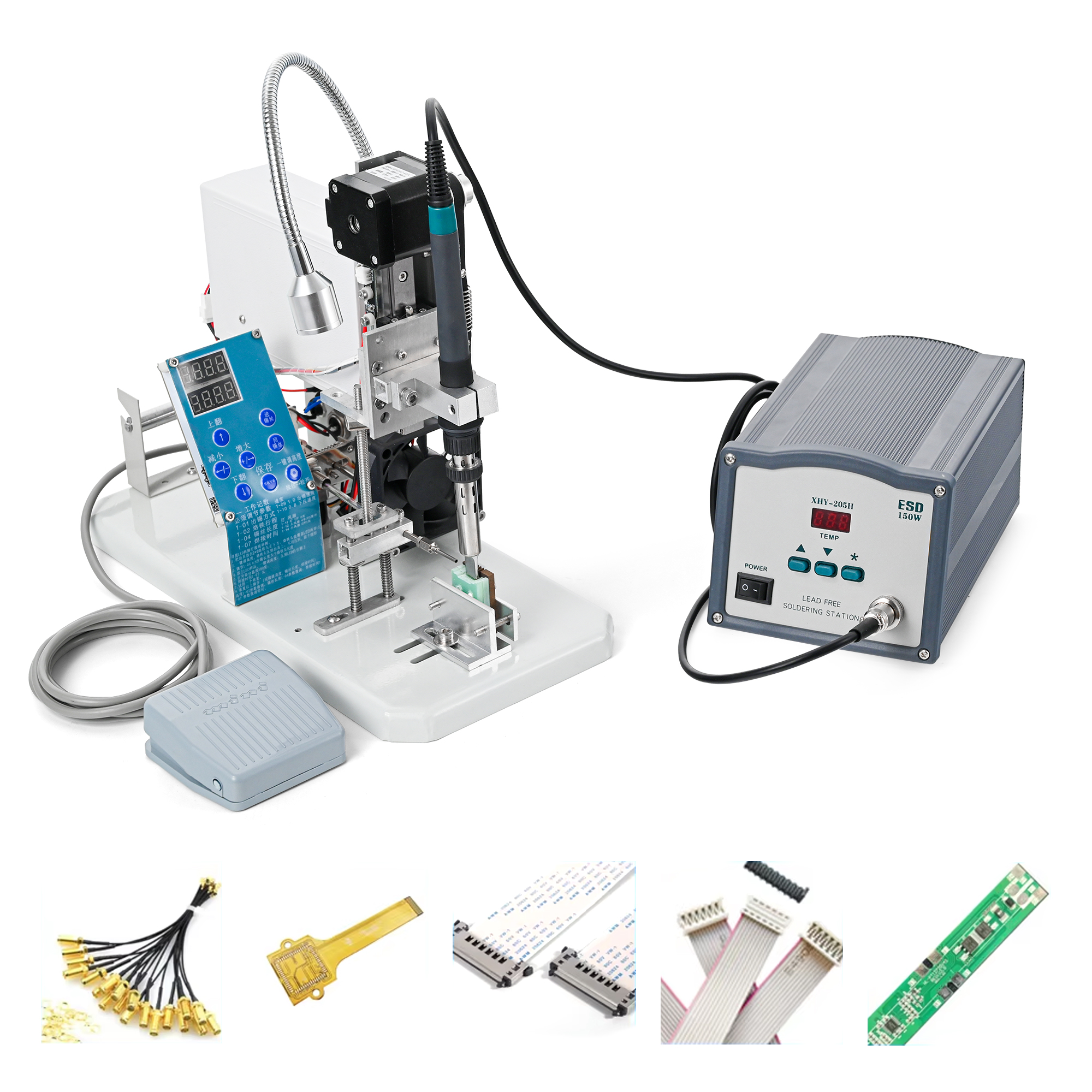
The electronics manufacturing world is rapidly shifting toward automated micro soldering systems.
Automated micro soldering uses robotic arms, vision systems, and pre-programmed routines to solder components with repeatability and speed that humans simply can’t match. It’s heavily used in large-scale PCB manufacturing, automotive electronics, and medical devices.
For small repair shops, semi-automated tools like hot air rework stations with programmable profiles are becoming more accessible. These allow technicians to set precise temperature curves for removing and replacing chips without guesswork.
While full automation isn’t practical for most repair shops yet, understanding the technology helps you stay ahead in the industry. Investing in programmable rework stations is a smart move for any serious micro soldering operation.
FAQs
What is micro soldering?
It is the process of soldering tiny electronic components onto circuit boards under magnification. It’s used in smartphone repair, laptop motherboard work, and electronics manufacturing where standard soldering tools are too large for the job.
What is the best micro soldering kit for beginners?
A good beginner kit should include a temperature-controlled iron station like the HAKKO FX-888D, fine solder wire (0.3mm), flux, tweezers, and solder wick. Adding a basic stereo microscope will significantly improve your results from day one.
Is a micro soldering microscope necessary?
Yes, especially for board-level repairs. A soldering microscope lets you see solder bridges, lifted pads, and component placement issues that are impossible to spot with the naked eye. It’s one of the most important investments you can make.
What is the best micro soldering station?
The Weller soldering station, particularly the WE1010NA, is widely regarded as one of the best for both beginners and professionals. It offers precise digital temperature control, reliability, and a wide range of compatible tips.
How do I find micro soldering repair near me?
Search Google for “micro soldering repair near me” or “board-level repair near me.” Look for shops with specific mentions of it, BGA work, or motherboard repair. Read reviews carefully and ask about their equipment before committing to a repair.
How much does micro soldering service cost?
It costs vary by repair type. Simple pad or trace repairs can start at 50 dollars. Complex BGA chip replacements or water damage repairs typically range from 150 to 400 dollars or more depending on the device and technician.
What is automated micro soldering?
Automated soldering uses robotic systems and computer-controlled tools to solder components with high precision and repeatability. It’s used primarily in electronics manufacturing and is becoming more accessible for professional repair shops through semi-automated rework stations.
How do I keep my micro soldering tips in good condition?
Use a brass wire cleaner instead of a wet sponge, tin your tip before and after every session, and replace tips when they show pitting or oxidation that won’t clean off. Quality tips from Weller or HAKKO last longer and perform better.
Can I learn it at home?
Yes. Start with a quality soldering station, a basic microscope, and practice boards. Watch tutorial videos from experienced technicians, start with simple pad repairs, and work your way up to more complex jobs as your confidence builds.
What solder should I use for soldering?
Use 0.3mm to 0.5mm rosin-core solder wire. Many professionals prefer 63/37 leaded solder for its lower melting point and excellent flow characteristics. For lead-free work, use SAC305 alloy with no-clean flux for best results.
Conclusion
Micro soldering is a skill that rewards patience, the right tools, and consistent practice.
To recap the 5 powerful tips you must know:
- Choose a proper micro soldering kit with a quality station and microscope
- Master your iron technique with temperature control and the 3-second rule
- Always use magnification for precision and to catch hidden issues
- Keep your tips clean, tinned, and replaced regularly
- Know when a job calls for professional soldering services
Whether you’re just starting out or looking to sharpen existing skills, applying these tips will immediately improve your results. The difference between a failed repair and a successful one often comes down to the basics done right.
Start small, practice consistently, and don’t be afraid to invest in better tools as you grow. The world of micro soldering is challenging, but mastering it opens doors to a highly valuable and in-demand skill set.
Ready to take the next step? Explore more electronics repair guides and tool recommendations right here on imagazine4u.com.